Stop Clicking Through GitHub Settings: Manage Actions Secrets with Terraform
Learn how to manage GitHub Actions secrets and environment variables with Terraform using the integrations/github provider, a nested repo/environment schema, and an S3-compatible RustFS backend.
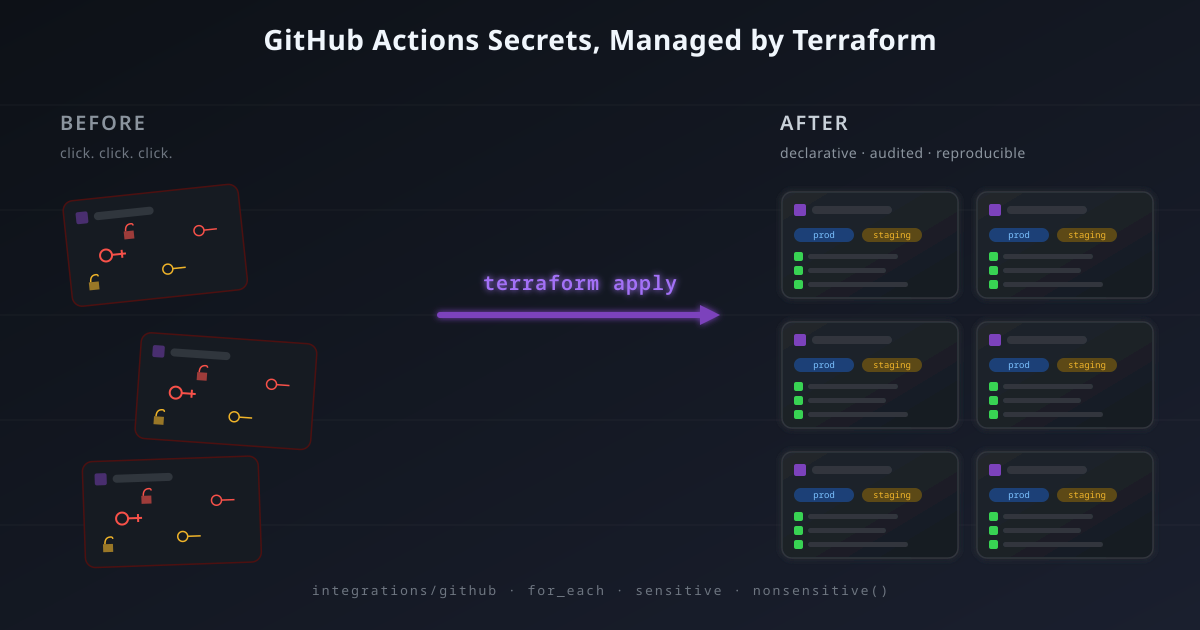
If you maintain more than three GitHub repositories with CI/CD, you've felt this pain: a new deploy key, a rotated API token, a new environment — and you sit there opening Settings → Environments → production → Add secret for every repo, every time. The web UI is fine for one repo. It does not scale to ten, and it absolutely does not scale to "we just rotated the SSH key, please update it everywhere by EOD."
So I moved every GitHub Actions secret and variable into Terraform — a single
nested map drives the whole fleet, and terraform apply is the only command
anyone needs to remember. This post is the honest version: the schema choices,
the sensitive trap that ate two hours of my life, and the RustFS-as-S3
gotchas that don't show up in the official docs.
If you want to read the module while following along, the public repository is here:
Repository: terraform-github
When to use this (and when not to)#
Be honest with yourself before adopting Terraform here. The GitHub web UI is genuinely fine for one or two repos that rarely change. Terraform earns its keep when:
- you have more than a handful of repos sharing the same secret pattern;
- secrets rotate regularly (deploy keys, deploy tokens, signing keys);
- you run multiple environments per repo (production, staging, development);
- multiple people touch the secrets and you want review + audit through PRs;
- you treat your CI/CD pipeline like infrastructure — reproducible, version-controlled, peer-reviewed.
The crossover is simple: the moment you copy-paste the same secret into three different repos, you've outgrown the UI.
Architecture#
The module reads existing repos, creates environments inside them, and writes env-scoped secrets and variables. State lives on RustFS.
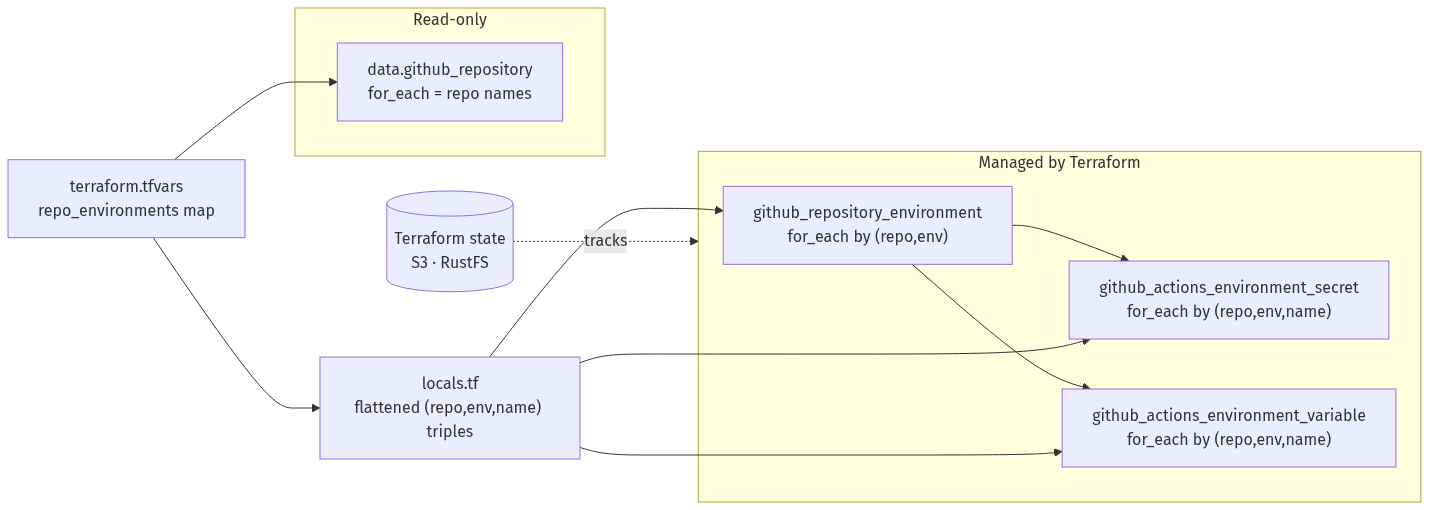
Three resource types, one input map, zero hand-written per-repo blocks.
The schema: one map to rule them all#
If you give yourself a separate variable for secrets, another for variables, and another for environment lists, you'll spend the rest of the project keeping them aligned. So I collapsed everything into a single nested map:
variable "repo_environments" {
  description = "Existing repos and their deployment environments"
  type = map(map(object({
    secrets   = optional(map(string), {})
    variables = optional(map(string), {})
  })))

  sensitive = true
  default   = {}
}
A user-facing entry then looks like:
repo_environments = {
  "backend-api" = {
    "production" = {
      secrets   = { DEPLOY_TOKEN = "ghp_...", DATABASE_URL = "postgres://..." }
      variables = { ENVIRONMENT = "production", LOG_LEVEL = "info" }
    }
    "staging" = {
      secrets   = { DEPLOY_TOKEN = "ghp_..." }
      variables = { ENVIRONMENT = "staging" }
    }
  }

  "docs-site" = {
    "production" = {
      variables = { SITE_URL = "https://docs.example.com" }
    }
  }
}
The optional(map(string), {}) defaults mean an environment can have just
variables, just secrets, or both. No required keys to remember.
Don't manage repos you didn't create#
The very first design decision was not to use github_repository as a
managed resource. Reason: someone else (or some other process) already created
those repos, and accidentally bringing them under Terraform management means a
single terraform destroy could wipe production code.
Instead, repos are looked up as data sources:
data "github_repository" "managed" {
  for_each = local.repo_names
  name     = each.value
}
If a repo doesn't exist (typo, wrong owner, lacking token access), the data source returns null and the plan fails loudly — exactly what you want. Terraform never deletes anything it doesn't own.
The trade-off: this module won't create repos. If you want that too, add a
parallel github_repository resource for new repos and keep this read-only
lookup for adopted ones.
The sensitive trap that cost me two hours#
Here's the gotcha that's not in any tutorial: the moment you mark
repo_environments as sensitive = true, everything derived from it
becomes sensitive too — including the keys of the map.
And Terraform refuses to use sensitive values as for_each keys, because
it would print them in the plan output. So:
# ❌ Fails: "for_each value cannot include values derived from sensitive output"
resource "github_repository_environment" "managed" {
  for_each = var.repo_environments
  ...
}
The fix: extract the keys (which are not secret — repo names and env names
aren't credentials) with nonsensitive(), and look the secret value up
inside the resource body where it can flow directly into the sensitive
attribute:
locals {
  flat_env_secrets = nonsensitive({
    for triple in flatten([
      for repo, envs in var.repo_environments : [
        for env, cfg in envs : [
          for name, _ in cfg.secrets : { repo = repo, env = env, name = name }
        ]
      ]
    ]) : "${triple.repo}/${triple.env}/${triple.name}" => triple
  })
}

resource "github_actions_environment_secret" "managed" {
  for_each = local.flat_env_secrets

  repository  = data.github_repository.managed[each.value.repo].name
  environment = github_repository_environment.managed["${each.value.repo}/${each.value.env}"].environment
  secret_name = each.value.name

  # secret value is looked up INSIDE the resource — it stays sensitive
  value = var.repo_environments[each.value.repo][each.value.env].secrets[each.value.name]
}
The keys (repo, env, name) are metadata. The value is the secret. They
travel separately. This pattern is the only way to combine for_each with a
sensitive map, and it's the central design of this whole module.
value, not plaintext_value#
If you copy a snippet from a 2022 blog post you'll see this:
plaintext_value = "..." # deprecated in integrations/github v6.xIt still kind of works, but it'll print a deprecation warning every plan and
will eventually break. Use value instead — same semantics, properly marked
sensitive:
value = var.repo_environments[...].secrets[...]This applies to both github_actions_secret and github_actions_environment_secret.
RustFS as the state backend: three flags you can't skip#
I host state on RustFS (self-hosted S3-compatible storage on my Proxmox
cluster). Three flags in providers.tf are non-negotiable, and I learned each
of them the hard way:
backend "s3" {
  bucket = "terraform-state"
  key    = "github-automation/terraform.tfstate"
  region = "us-east-1"

  use_path_style              = true   # RustFS doesn't do virtual-hosted style URLs
  skip_credentials_validation = true   # AWS STS doesn't exist on RustFS
  skip_metadata_api_check     = true   # there's no EC2 IMDS
  skip_region_validation      = true   # 'us-east-1' is just a dummy here
  skip_requesting_account_id  = true   # no IAM, no account ID
  skip_s3_checksum            = true   # ← the killer one, explained below
  encrypt                     = false
}
The checksum gotcha#
The AWS SDK v2 (which Terraform's s3 backend uses since 1.5+) started sending
checksum trailers on uploads. RustFS rejects them with a 400 or signature
mismatch. The flag skip_s3_checksum = true disables this. Without it, every
state save fails.
If you're on Terraform 1.11.2 or newer, that flag alone isn't enough — the SDK
ignores it for PutObject. You also need two env vars set persistently:
set -Ux AWS_REQUEST_CHECKSUM_CALCULATION when_required
set -Ux AWS_RESPONSE_CHECKSUM_VALIDATION when_required
(I learned this one when state writes silently started failing with
XAmzContentSHA256Mismatch after a Terraform upgrade. Keep both belts on.)
Backend config can't be variables#
A subtle but important constraint: the backend "s3" block runs before
Terraform even reads variables.tf or terraform.tfvars. So you can't put
the endpoint URL, access key, or secret key in a variable.
The clean solution is backend.hcl (gitignored, never committed):
# backend.hcl
endpoints = {
  s3 = "https://rustfs.example.com"
}

access_key = "RUSTFS_ACCESS_KEY"
secret_key = "RUSTFS_SECRET_KEY"
Then init with:
terraform init -backend-config=backend.hclThe constant flags (use_path_style, skip_*) stay in providers.tf. The
secret-bearing values live in backend.hcl. Best of both worlds.
Debugging SignatureDoesNotMatch#
Of all the errors I hit, this is the one that wasted the most time:
Error: Failed to get existing workspaces: operation error S3: ListObjectsV2,
api error SignatureDoesNotMatch: The request signature we calculated does not
match the signature you provided. Check your key and signing method.
SignatureDoesNotMatch means the request reached RustFS, but the request
signature didn't match. The signature includes the region, the keys, and the
request body — so any drift in those will fail. The actual cause is almost
always one of:
- Wrong credentials — copy-paste added a trailing newline or quote.
echo "[$AWS_ACCESS_KEY_ID]"to spot whitespace. - Wrong region — RustFS doesn't care what region you pick, but the
signature does. Pick something normal like
us-east-1and stay there. - Checksum trailer — see the previous section.
The error message is the same for all three, so debug in that order.
Adopting environments that already exist#
If production already exists on a repo (because someone clicked through and
set it up before), terraform apply will adopt it — but reset any custom
settings (required reviewers, wait timers, branch policies) to defaults,
because Terraform doesn't see them.
To preserve existing settings, import first:
terraform import 'github_repository_environment.managed["backend-api/production"]' backend-api:productionThe import ID format is <repo>:<env>. After import, run terraform plan
and look at the diff: anything Terraform wants to change is what your config
doesn't yet declare. Either add the missing attributes (recommended) or
remove the environment from Terraform if you don't want to manage it.
Cleaning up: terraform state rm#
When you stop managing a repo's environments — say it got transferred to another org, or it's being archived — there are two correct approaches:
Option A: Stop managing, keep them on GitHub. Remove from state without destroying:
terraform state rm \
  'data.github_repository.managed["backend-api"]' \
  'github_repository_environment.managed["backend-api/production"]' \
  'github_actions_environment_secret.managed["backend-api/production/DEPLOY_TOKEN"]'
Then also remove the repo from terraform.tfvars, otherwise the next
plan re-adopts it.
Option B: Actually delete them. Remove from terraform.tfvars first,
then terraform apply — Terraform will destroy the environments and their
secrets on GitHub.
I prefer Option A almost always: the act of removing from terraform.tfvars
should never be the trigger for production deletion. Make destruction a
deliberate two-step action.
What the module produces#
Three useful outputs that downstream automation can consume:
| Output | Description |
|---|---|
repository_full_names | Map of repo name → owner/repo |
repository_urls | Map of repo name → HTML URL |
managed_environments | Sorted list of repo/env pairs created by Terraform |
managed_environments is the one I use most — it's a flat audit list of every
deployment environment under Terraform's control, which I dump into our
internal docs after every apply.
What this module does not do (deliberately)#
- Create repositories. Use
gh repo createor a separategithub_repositoryresource. Keeping creation and configuration separate means you can adopt existing repos without risk. - Repository-level secrets. Everything is environment-scoped because that's how production-grade CI/CD should be structured. If you really need a repo-level secret, add a
github_actions_secretresource — but think first about whether it should be env-scoped. - Branch protection or environment protection rules. Add them explicitly if you need required reviewers, wait timers, or branch-policy restrictions. Default behavior gives you a permissive environment that anyone with
writecan deploy to — fine for staging, often not fine for production. - Cross-organization repos. A single module instance assumes one
github_owner. If you have repos under both your personal account and an org, run two Terraform workspaces.
These omissions aren't laziness — they're explicit trade-offs that keep the blast radius small.
Bringing it home#
The thing I appreciate most about this setup, four months in, isn't the
automation — it's the review trail. Every secret rotation, every new
environment, every variable change shows up as a pull request that someone
else approves. Nobody fat-fingers a deploy token into prod anymore.
Onboarding a new microservice is "add a block to terraform.tfvars and open
a PR" — there's no Confluence runbook to update.
The Terraform code lives in a private repo behind RustFS-encrypted state, and the only credential anyone needs in their shell is a short-lived GitHub PAT plus a RustFS access key from a sealed envelope. The blast radius of a compromised laptop is "they can read the encrypted state file" — not "they can rotate every deploy key in the org".
If you've been clicking through GitHub settings for too long, this is the
pattern. The provider is integrations/github ~> 6.0. The flags you need
are above. The gotchas are documented. Go.