From Clicking VMs to a Private Cloud: Terraform + Proxmox (the parts the docs skip)
A practical guide to managing Proxmox VMs and LXCs with Terraform, including template builds, for_each workloads, S3-compatible state, cloud-init, and real-world gotchas.
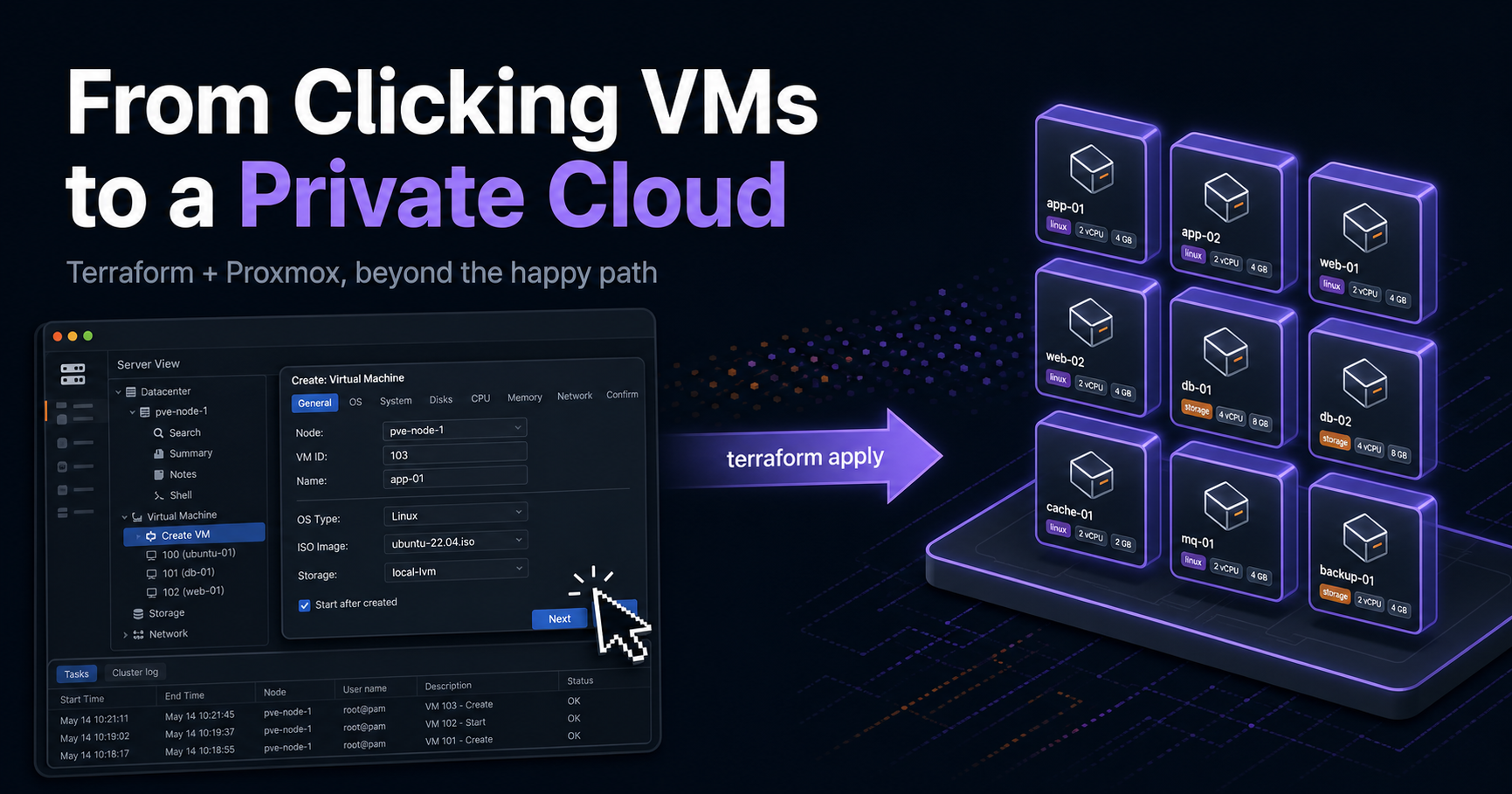
From Clicking VMs to a Private Cloud: Terraform + Proxmox (the parts the docs skip)#
I had a Proxmox cluster and a bad habit: every time I needed a VM, I clicked through the web UI — clone a template, set the IP, paste an SSH key, tag it, start it. It works for one VM. It does not work when "give me three identical workers on this VLAN, tagged to project X" becomes a weekly request.
So I turned my Proxmox node into a small self-service private cloud with
Terraform: describe the fleet in code, terraform apply, done. This post is the
honest version — the architecture, the design decisions and why I made them,
and especially the production gotchas that cost me hours and aren't on page one
of any search.
If you want to read the module while following along, the public repository is here:
Repository: terraform-proxmox-public
When to use this (and when not to)#
Be honest with yourself before adopting Terraform here. The web UI is genuinely fine for 2–3 static pet VMs you set once. Terraform earns its keep when:
- you provision or recreate VMs regularly (not once-and-forget);
- you have more than a handful, or they follow patterns;
- multiple people touch the infra and you want review + audit;
- you need environments (dev/stage/prod) or fast teardown/rebuild;
- you want self-hosted infra to behave like a cloud — self-service, tagged, reproducible.
The crossover point is simple: the moment your cluster becomes "a platform other people request VMs from," Terraform is the right call. That's the private-cloud scenario this whole post is built around.
Architecture#
The module does everything end-to-end in one apply:
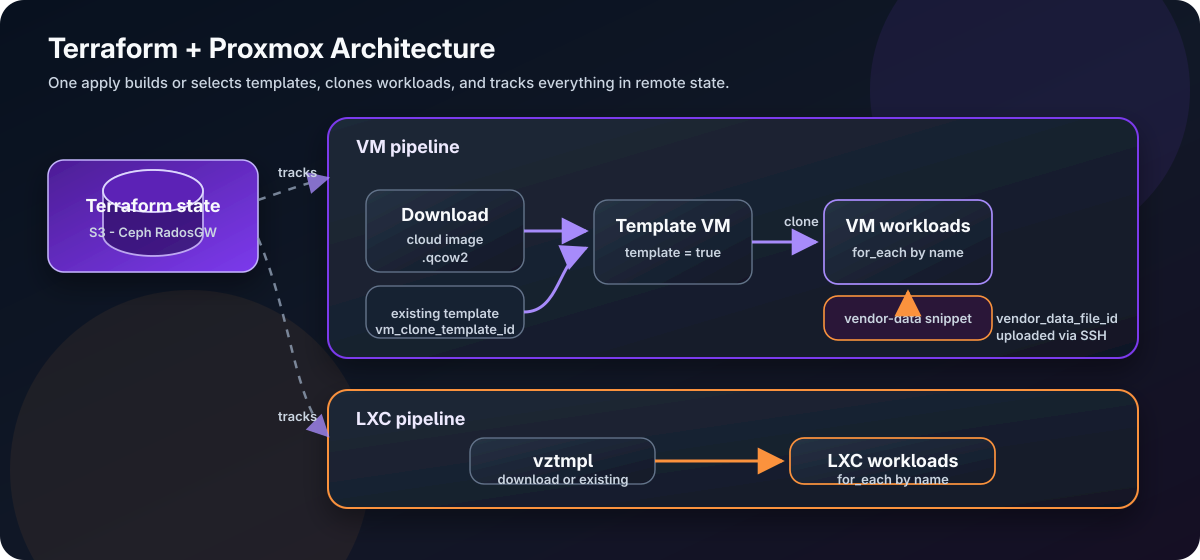
Two stages: build a golden template once (download a cloud image, convert to
template = true), then clone many workloads from it. You can also point at a
template that already exists, or clone non-cloud-init templates.
Key design decisions (and the why)#
1. bpg/proxmox, not telmate/proxmox#
The older telmate provider can only clone an existing template — it can't
download a cloud image or build the template for you. bpg/proxmox can do the
whole pipeline (proxmox_download_file → VM with template = true), is actively
maintained, targets PVE 9.x, and models cloud-init as a structured block. For a
"build it all in code" goal, bpg wins.
2. for_each keyed by VM name — never count#
This is the single most important correctness decision. The difference isn't "list vs map" — it's how Terraform identifies each instance in state:
countaddresses by index:vm[0],vm[1]. Delete the middle one and every later VM's address shifts — Terraform destroys and recreates them. Catastrophic for VMs.for_eachaddresses by stable key:vm["db-01"]. Add or remove anything else and that address never moves.
resource "proxmox_virtual_environment_vm" "workload" {
  for_each = var.workloads
  name     = each.key            # the map key IS the identity
  # ...
}
If you ever rename a key, use a moved {} block (reviewed, in code) rather than
terraform state mv on the CLI.
3. Tags enforced in locals, pre-sorted#
Proxmox has no metadata map — just flat string tags. I enforce a tagging contract
(environment-*, project-*, managed_by-terraform) centrally so no VM can be
created without it, and I sort the list:
workload_tags = {
  for name, spec in var.workloads :
  name => sort(distinct(concat(local.base_tags, spec.tags)))
}
Why sort? bpg stores tags in canonical sorted order. An unsorted input produces a perpetual diff on every plan. (Gotcha #7 below.)
4. Guardrails as preconditions#
VMIDs are cluster-unique; a collision is a painful runtime failure. A central
terraform_data.id_guard fails the plan before touching anything:
- duplicate VMIDs within the config,
- a requested VMID already used by a foreign VM on the cluster (live data source),
- invalid template-source combos,
use_cloud_configwithout SSH, ballooning floor > memory, cloud-init without an IP.
Catching mistakes at plan time is the whole point of IaC.
5. Cloud-init: structured user_account + a vendor-data snippet#
bpg gives you structured cloud-init (ciuser, sshkeys, ipconfig) over the
API — no extra plumbing. But it can't install packages. To get
qemu-guest-agent onto the guest, I add a vendor-data snippet. Crucially I
use vendor_data_file_id, not user_data_file_id, because the latter
conflicts with user_account. Vendor-data is merged with user-data, so I keep
the structured users/keys and layer on packages + runcmd:
vendor_data_file_id = var.use_cloud_config ? proxmox_virtual_environment_file.vendor_data[each.key].id : nullThe gotchas nobody documents#
This is the part I wish I'd read before starting. Each one cost real time.
Gotcha #1 — RadosGW state: XAmzContentSHA256Mismatch#
Error: Failed to save state
... api error XAmzContentSHA256Mismatch: UnknownError
I'm storing state on Ceph RadosGW (S3-compatible). The backend has
skip_s3_checksum = true, yet state saves still failed. The cause: Terraform
≥ 1.11.2 ignores skip_s3_checksum on PutObject — the AWS SDK v2 computes a
content checksum the non-AWS gateway rejects. The fix is SDK-level env vars:
set -Ux AWS_REQUEST_CHECKSUM_CALCULATION when_required
set -Ux AWS_RESPONSE_CHECKSUM_VALIDATION when_required
Keep skip_s3_checksum = true too; the env vars are the missing piece. This
applies to MinIO and other S3-compatible stores as well.
Gotcha #2 — API token: 401, then 403 Permission check failed#
Two different errors people conflate:
- 401 Authentication failed = bad credential. Token format must be
user@realm!tokenid=SECRET; the secret is shown only once at creation. - 403 Permission check failed = authenticated but not authorized. Two traps
here:
- Privilege separation — tokens start with zero rights even if their user is admin. Grant a role to the token.
- Even with
PVEAdmin, downloading a cloud image fails, becausequery-url-metadatarequiresSys.AccessNetwork— a privilegePVEAdmindoes not include (it's a newer SSRF-mitigation privilege).
pveum role add TerraformNet --privs "Sys.AccessNetwork"
pveum acl modify / --roles TerraformNet --tokens 'terraform@pve!tf'
Gotcha #3 — import content rejects .img#
Error: 400 ... (filename: invalid filename or wrong extension)The import content type only accepts .qcow2, .raw, .vmdk, .ova. Ubuntu's
*-cloudimg-amd64.img files are actually qcow2 despite the name. Download from
the .img URL but store with a .qcow2 extension:
template = {
  image_url       = "https://cloud-images.ubuntu.com/jammy/current/jammy-server-cloudimg-amd64.img"
  image_file_name = "jammy-server-cloudimg-amd64.qcow2"   # <-- the fix
  # ...
}
Gotcha #4 — QEMU agent timeout makes plans crawl#
Warning: error waiting for network interfaces from QEMU agent
timeout while waiting for the QEMU agent on VM "784"
If you enable the agent in Terraform but the guest isn't running
qemu-guest-agent, bpg blocks until a timeout on every started VM. Don't enable
the agent until the guest actually runs it. I made it a toggle defaulting to off,
and install the agent via the vendor-data snippet first — then enable it.
Gotcha #5 — Snippets are uploaded over SSH, not the API#
proxmox_virtual_environment_file with content_type = "snippets" needs the
provider's ssh block. Why? The Proxmox REST API has no endpoint to upload a
snippet file. Native cloud-init fields are API config values (no SSH), but a
custom user/vendor-data snippet is a file in the datastore's snippets/
directory, so bpg SSHes in and writes it. Requirements: an ssh block, and the
datastore must have the Snippets content type enabled.
Gotcha #6 — cloud-init is first-boot-only (and the password is invisible)#
Changed a cloud-init password in tfvars and got "No changes"? Two reasons:
- Proxmox returns
cipasswordmasked (**********), so the provider can't diff it. - cloud-init's user/password module runs once, on first boot. Editing it does nothing to a VM that already booted.
For day-2 password changes on a running VM, use passwd in the guest. To re-seed,
recreate the VM (terraform apply -replace=...). Same applies to vendor-data
snippets — they apply on first boot.
Gotcha #7 — cicustom is invisible in the GUI#
Your vendor-data reference lives in cicustom, which the Proxmox web UI's
Cloud-Init tab does not show. It's CLI/API only:
qm config 784 | grep cicustom        # vendor=local:snippets/vendor-data-x.yaml
cat /var/lib/vz/snippets/vendor-data-x.yaml
# note: `qm cloudinit dump` only supports user|network|meta — NOT vendor
Upside: Terraform is the single source of truth and nobody can silently change it in the UI.
Bonus: don't put file() in terraform.tfvars#
Error: Functions may not be called here..tfvars files take literal values only. Pass a path string in tfvars and
call file() inside a .tf file:
# tfvars: a literal path
proxmox_ssh = { username = "root", private_key_file = "/home/me/.ssh/id_ed25519" }

# providers.tf: the function call lives here
private_key = file(pathexpand(ssh.value.private_key_file))
How cloud-init actually reaches the VM#
This flow confuses everyone, so here it is explicitly. Terraform does not write
into the VM. It writes a file to the node and sets a pointer; Proxmox assembles the
media the guest reads at boot:
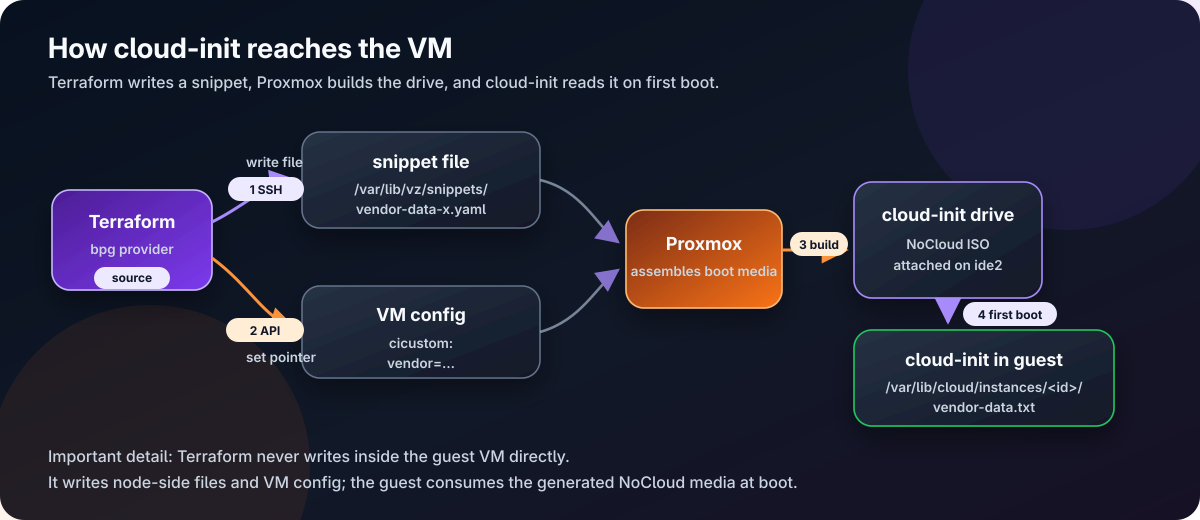
The files you find under /var/lib/cloud/instances/.../vendor-data.txt inside the
VM are step [4] — proof the whole chain worked.
A real scenario: a 3-tier app in one apply#
# terraform.tfvars (excerpt)
use_cloud_config = true
proxmox_ssh      = { username = "root", private_key_file = "/home/me/.ssh/id_ed25519" }

workloads = {
  "web-01" = { cores = 2, memory = 4096, ip_address = "10.0.0.11/24", gateway = "10.0.0.1", tags = ["role-web"] }
  "web-02" = { cores = 2, memory = 4096, ip_address = "10.0.0.12/24", gateway = "10.0.0.1", tags = ["role-web"] }
  "db-01"  = { cores = 4, memory = 8192, ip_address = "10.0.0.21/24", gateway = "10.0.0.1", tags = ["role-db"] }
}

lxc_workloads = {
  "proxy-01" = { cores = 1, memory = 512, ip_address = "10.0.0.5/24", gateway = "10.0.0.1", tags = ["role-proxy"] }
}
terraform apply → two web VMs, a database VM, and an LXC reverse proxy, all
tagged, agent-equipped, reproducible. Need two more web nodes? Add two map
entries. Tear it all down for the night? terraform destroy. That's the private
cloud.
Testing before you trust it in production#
A condensed checklist (full plan in the repo):
- Prereqs: token authn (curl),
Sys.AccessNetwork, SSH works, datastores haveimport/snippetscontent, RadosGW bucket exists, checksum env vars set. - Idempotency:
applytwice → "No changes." for_eachsafety: add/remove a workload → others untouched (no recreate).- Guardrails (negative tests): duplicate VMID, cluster collision, snippet without SSH — each must fail at plan.
- Cloud-init end-to-end: recreate a VM with the snippet →
qemu-guest-agentactive, IPs reported onceqemu_agent_enabled = true. - Drift: change a VM in the GUI →
planflags it. - Teardown:
destroyleaves nothing orphaned.
Takeaways#
- The best reason to use Terraform on Proxmox is infrastructure you can recreate, review, and reason about as code — the UI gives you a running system; Terraform gives you a reproducible definition of it.
- The happy path is easy. The value of writing it down is the gotchas:
RadosGW checksums, token privileges (
Sys.AccessNetwork), the.qcow2extension rule, the agent timeout, cloud-init's first-boot model, and snippets needing SSH. - Pick bpg, key with
for_each, enforce tags + guardrails in code, and treat cloud-init as first-boot.
If you're running self-hosted infra that's growing into a platform, this is the point where clicking stops scaling and code starts paying off.
The full Terraform module, examples, and README are available in the public repo: terraform-proxmox-public.